Stop Sending Emails Into the Void
Verify any email list in Google Sheets, no new tools, no exports, no guesswork.
Trusted by teams using
Does this sound like you?
You're not alone. These are the email headaches that teams deal with every week.
Bounce rates killing your sender score
High bounces flag your domain as spam and tank deliverability for every future campaign.
Manually deleting bad emails one by one
Hours wasted on tedious cleanup that should take seconds, not half your afternoon.
Wasting ad budget on invalid contacts
Paying to reach email addresses that don't exist or will never open anything.
Switching between 3 tools just to clean a list
Export from Sheets, upload to a verifier, download results, re-import. Every. Single. Time.
Never knowing if your list is actually clean
Sending with fingers crossed because you have no visibility into list health before you hit send.
Everything you need, already in your spreadsheet
Easy-to-implement features that just work.
One-click verify
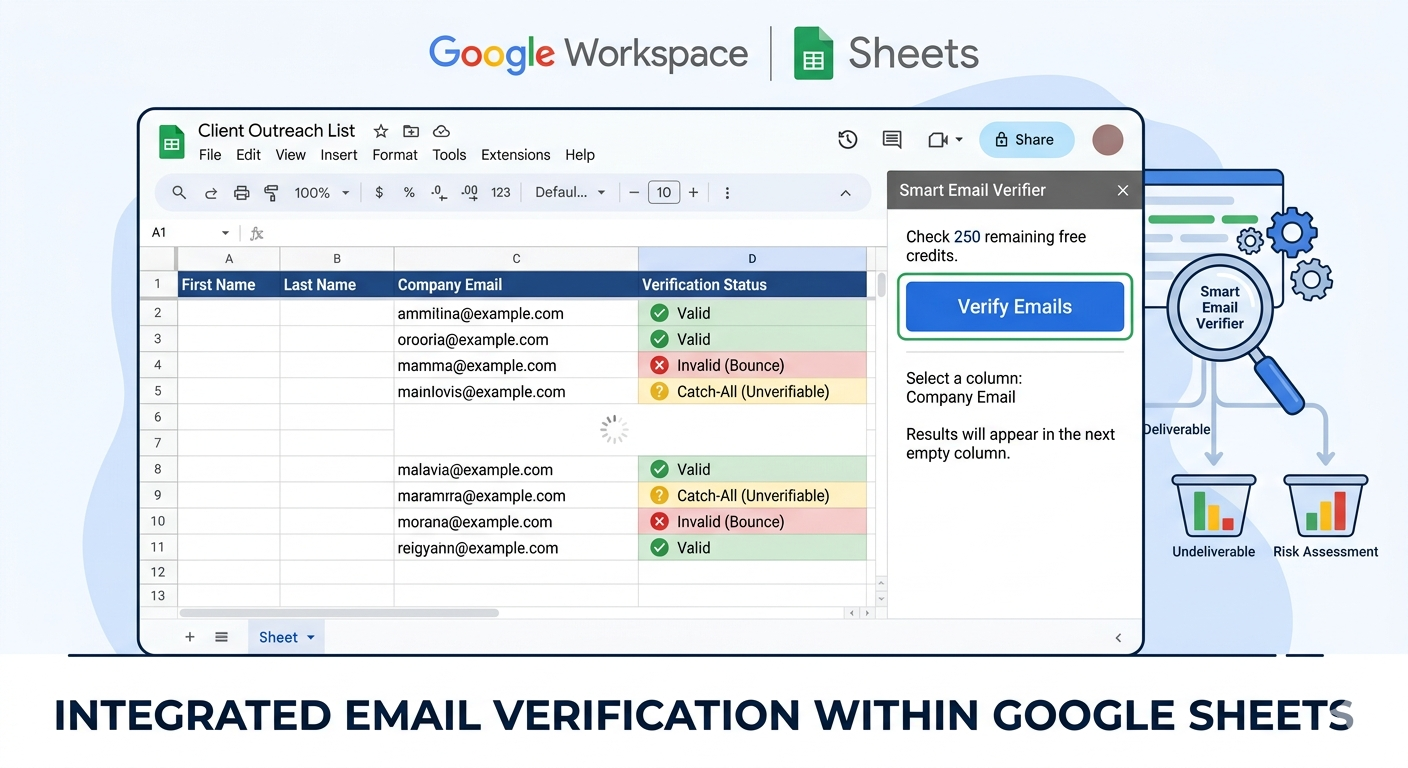
Select column, click verify. Done.
- • No exports or imports needed
- • Works on any column size
- • Results appear instantly
3 providers built-in
NeverBounce, ZeroBounce, MillionVerifier
- • Switch providers in one click
- • Industry-leading accuracy
- • Use your existing API keys
Results in your sheet
Valid/Invalid/Catch-all written back instantly
- • Filter and sort immediately
- • No copy-paste required
- • Results stay with your data
Clear error reasons
Know exactly why an email failed
- • HTTP 401, 429, and more
- • No more mystery 'Unknown' statuses
- • Fix issues without leaving Sheets
License in the sidebar
No external dashboard needed
- • Activate directly in the add-on
- • One-click license reset
- • Quota and expiry at a glance
Choose Your Plan
Start free and upgrade when you need more verifications. No hidden fees.
Available on Google Workspace Marketplace
Instant activation · Cancel anytime
Here's what teams got back after switching
Focus on transformation and ease.
Alex M.
Growth Lead
"I used to export, upload to a verifier, re-import. Now I just click verify. Game changer."
Sarah K.
Email Marketing Manager
"Our bounce rate dropped from 12% to under 1% in one campaign. I didn't change anything else."
* Testimonials represent aspirational outcomes. Replace with real customer quotes when available.
Relatable scenarios for easy adoption
See exactly how things change once verification is built into your workflow.
Email List Hygiene
Unverified list sent to 5,000 contacts. 600 bounced, sender reputation flagged.
Same list verified in Sheets. 580 invalid emails removed before send.
Campaign Prep
Export → upload to verifier → wait → download → re-import into Sheets.
Select column, click verify, filter invalid rows. Entire workflow stays in one tab.
CRM Cleanup
CRM export sitting in Sheets with no way to know which emails are still good.
Every contact has a Valid/Invalid/Catch-all status. Ready to sync back instantly.
Highlight small, achievable wins
Real results from teams like yours.
Marketing team cleaned 5,000 contacts before Q4 campaign. Zero deliverability issues.
Marketing TeamOperations team eliminated their manual export-upload-reimport workflow completely.
Operations TeamReduced wasted sends and avoided deliverability penalties from repeated high bounce rates.
RevOps TeamYou already work in Google Sheets.
Your email lists are already there.
The only thing missing is knowing which addresses are real.
Smart Email Verifier fills that gap, in one click, without changing your workflow.
Free to start. Simple to use. Results you can see.
About This Add-on & Data Usage
Smart Email Verifier is a Google Sheets add-on that verifies the deliverability of email addresses directly inside your spreadsheet. You select a column of emails, choose a verification provider (NeverBounce, ZeroBounce, or MillionVerifier), and the add-on checks each address via that provider's API, writing the result (Valid, Invalid, or Catch-all) back into your sheet, without exporting or leaving Google Sheets.
Google Sheets: Read & Write
The add-on reads email addresses from the column you select and writes verification results (Valid, Invalid, Catch-all) back to your sheet. It only accesses the active spreadsheet, never any other files in your Drive.
Your API Keys: Stored in Your Spreadsheet
When you provide an API key for NeverBounce, ZeroBounce, or MillionVerifier, it is stored in your spreadsheet's user properties, not on our servers. Keys are used only to call the chosen verification provider on your behalf.
What We Do Not Access
We do not access your Gmail, Google Drive files, Google Contacts, calendar, or any personal account information. We do not store, sell, or share email addresses you verify.
Third-Party Providers
Email addresses are sent to the verification provider you select (NeverBounce, ZeroBounce, or MillionVerifier) solely to check deliverability. Each provider has its own privacy policy governing how they handle data.
Why we actually build these tools
If we're honest, it comes down to privacy. We're a small team, not a venture-backed company with a dedicated security department, and every tool we ship starts from the same question: would we hand our own data to this? If the answer's no, we don't build it that way. That's the real reason half of what's on this site exists — not because a security badge looks good on a landing page, but because we didn't want to be the company someone else has to worry about.
Read our privacy policy →